6 Rollback Protection
Protect your website during updates with automatic backups, one-click rollback restoration and configurable backup retention policies.
✓ Automatic Backups
✓ One-Click Restore
✓ Backup Downloads
✓ Flexible Retention Policies
✓ One-Click Restore
✓ Backup Downloads
✓ Flexible Retention Policies
What is Rollback Protection?
Rollback Protection automatically creates backup snapshots before updates, allowing you to restore a previous working version whenever needed.
Rollback Protection automatically creates backup snapshots before updates, allowing you to restore a previous working version whenever needed.
Step 1: Rollback Settings & Backup Retention
Rollback Settings control automatic backup creation, retention duration and stored snapshot limits.
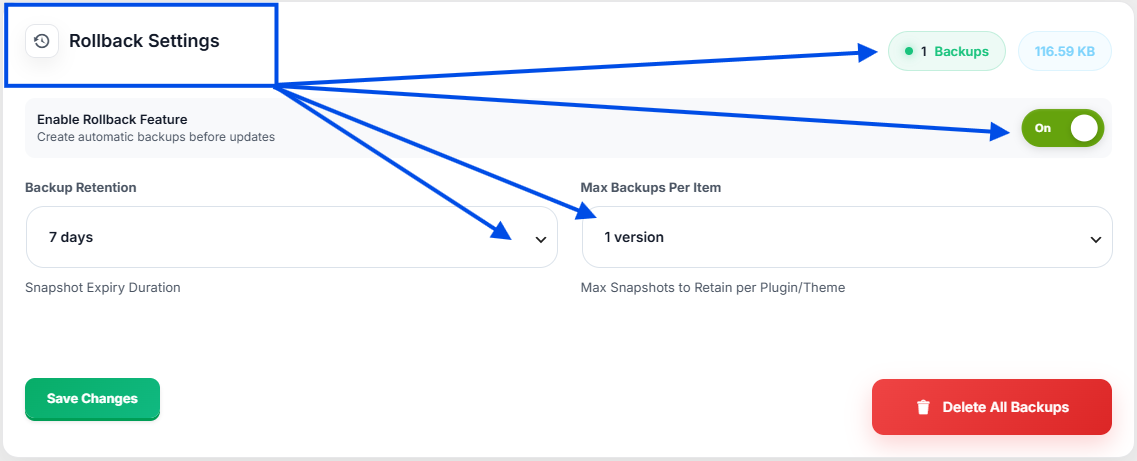
| Option | Description |
|---|---|
| Enable Rollback Feature | Create backups automatically before updates. |
| Backup Retention | Choose how long backups are stored. |
| Max Backups Per Item | Limit stored versions for each product. |
| Total Backups | Displays the number of stored backups. |
| Delete All Backups | Remove all stored backup snapshots. |
Important:
Disabling rollback protection prevents automatic backup creation before updates.
Disabling rollback protection prevents automatic backup creation before updates.
Step 2: Restore Previous Version
If an update causes compatibility issues or unexpected behavior, you can instantly restore a previously backed up version using the Restore Backup button.
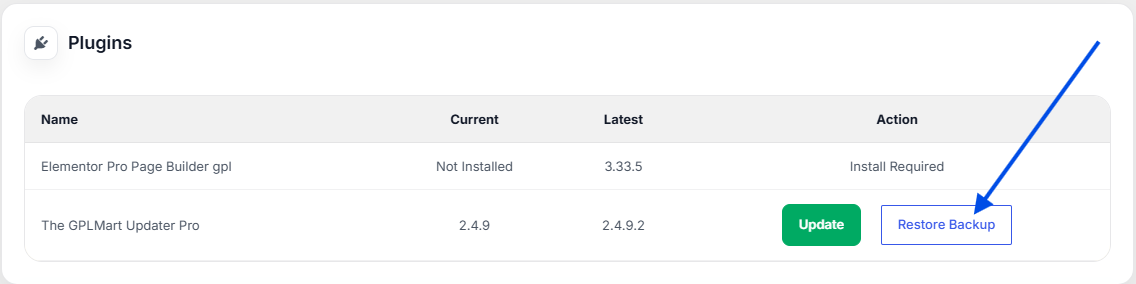
| Action | Description |
|---|---|
| Restore Backup | Restore the most recent backup snapshot. |
| One-Click Recovery | Quickly return to a stable version. |
Step 3: Backup Snapshots & Downloads
All backup snapshots are stored inside Update History where you can review and download backup archives.
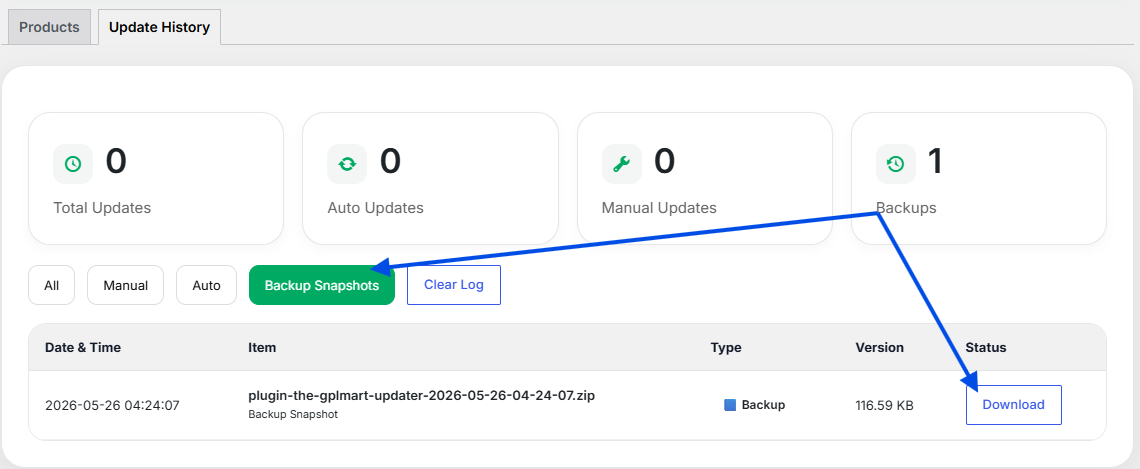
| Feature | Description |
|---|---|
| Backup Snapshots | View all stored backup archives. |
| Download Backup | Download backup ZIP files locally. |
| Backup History | Track backup creation dates and sizes. |
Note:
Rollback functionality is only available when a backup snapshot exists for the selected plugin or theme.
Rollback functionality is only available when a backup snapshot exists for the selected plugin or theme.
Benefits of Rollback Protection
- Automatic backup creation before updates
- One-click rollback recovery
- Safe plugin and theme updates
- Backup download support
- Flexible retention settings
- Reduced downtime after failed updates
Last Updated: June 2026
GPLMart Updater Version: 8.0.9
GPLMart Updater Version: 8.0.9